Connect Claude to Your Marketing Data: FUSE MCP Server
Ask Claude about your live Google Ads, GA4, Meta, and Shopify performance in plain English. Add the FUSE MCP connector in two minutes. Read-only, no API keys.
Connect your marketing data to Claude in under two minutes and ask about your Google Ads, GA4, Meta Ads, and more in plain English, right where you already work.
The short version:
✓ Add one connector and Claude can query your live marketing data. No exports, no copy-paste.
✓ Covers Google Ads, GA4, Google Search Console, Meta Ads, TikTok Ads, LinkedIn Ads, Klaviyo, and more
✓ Setup takes about two minutes, with no code and no API keys to manage
✓ Ask in plain English: "How are my Google Ads campaigns performing this month?"
✓ Read-only and scoped to your workspace, so Claude can read your data but never change your campaigns
✓ Works with Claude, ChatGPT, Cursor, and any MCP-compatible client
The server lives at https://mcp.fuse.is/mcp. Add it as a custom connector, sign in with your FUSE account, and start asking.
Why Connect Your Marketing Data to Claude?
FUSE has always been built on one idea: you should be able to ask your marketing data anything, in plain English, and get a real answer backed by real data.
Until now, that conversation happened inside FUSE. But marketers don't live in one tab. You're drafting a board update in Claude, sanity-checking a media plan, or pulling numbers into a doc. Your marketing intelligence should follow you there.
This isn't a bolt-on. FUSE's AI has run on the Model Context Protocol internally since day one. Our own agents discover each datasource's tools at runtime instead of hardcoding integrations, and the public server exposes that same engine. So when Claude asks FUSE a question, it runs the exact analysis that powers FUSE chat: it plans the query, pulls from your connected datasources, and reasons over the results. You get a real answer, not a cached dashboard number.
What this unlocks:
- Ask from anywhere. Query your marketing data mid-conversation, without switching context.
- Combine with everything else. Claude can pull your FUSE insights into docs, emails, and strategy memos alongside its other tools.
- One source of truth. Answers come from the datasources you've already connected and vetted in FUSE, not from a model's guesswork.
How to Connect Claude to Your Marketing Data
Setup takes about two minutes. You'll need a FUSE account with at least one datasource connected, and a Claude account. Custom connectors are available on every Claude plan, including Free, though Free accounts are limited to one custom connector.
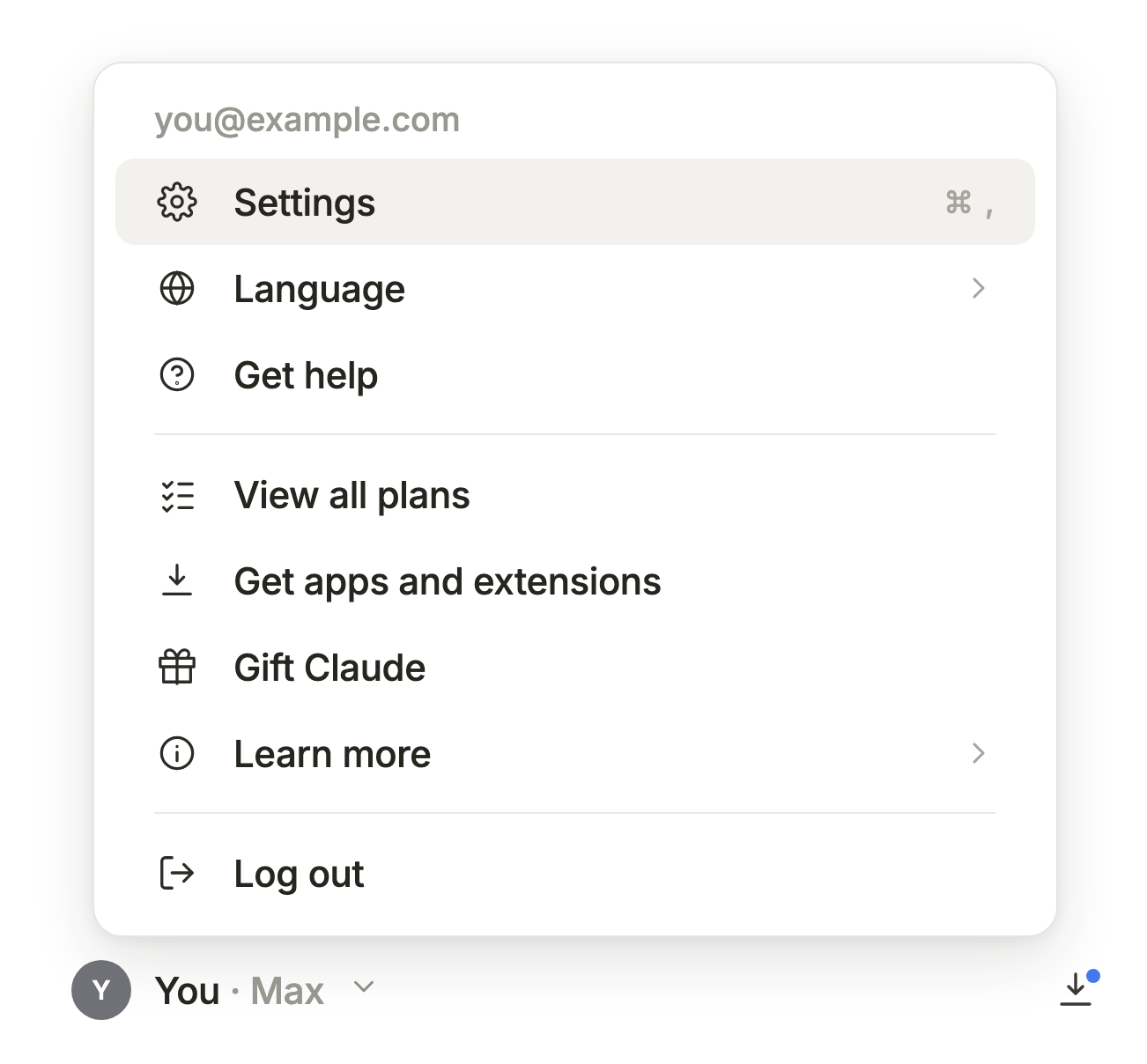
Step 1: Open Claude's Settings
In Claude, open Settings (or press Cmd + , on Mac).
Step 2: Go to Connectors
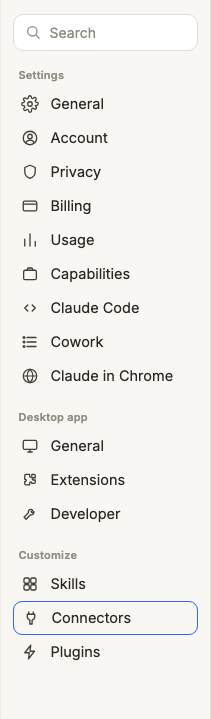
Click Connectors in the left sidebar.
Step 3: Add a Custom Connector
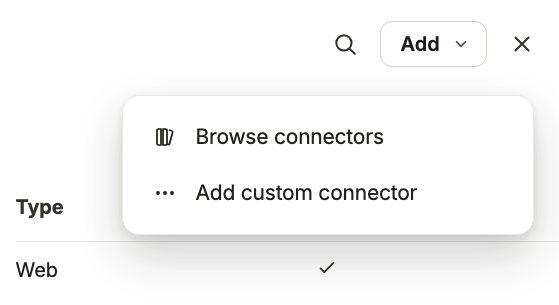
Click Add, then choose Add custom connector.
Step 4: Enter the FUSE MCP URL
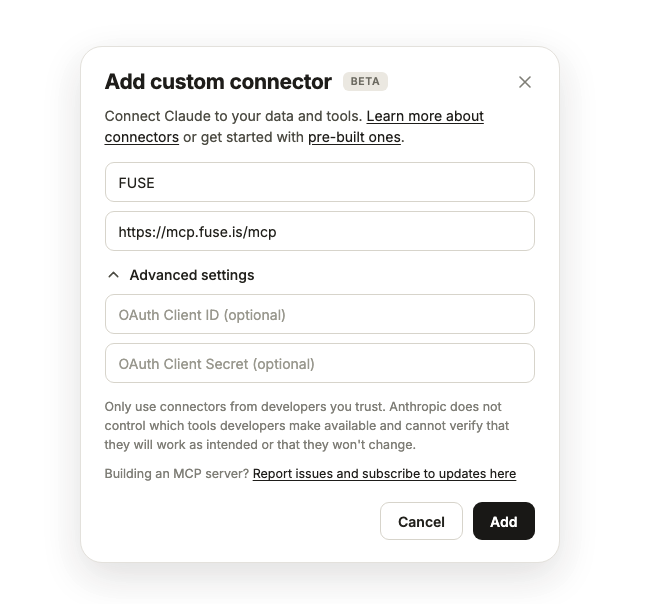
Give the connector a name (we suggest "FUSE") and enter the URL:
https://mcp.fuse.is/mcp
Step 5: Sign In and Authorize
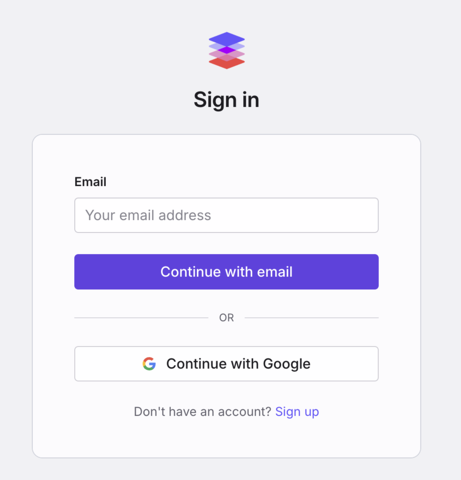
You'll be taken to a FUSE sign-in screen. Log in with your FUSE account and accept the authorization. No API keys to copy, no passwords shared with Claude.
Step 6: Confirm It's Connected
Back in Claude, the connector should show as Connected. Try your first question:
What workspaces do I have connected via FUSE?
Claude will list your FUSE workspaces and the datasources inside each. From there, you can start asking real questions.
On a Claude Team or Enterprise plan? An Owner needs to add the connector at the organization level first (Organization settings → Connectors). After that, each member connects with their own FUSE login, so everyone only sees the workspaces they already have access to.
Using ChatGPT, Cursor, or another client? FUSE is a standard remote MCP server, so the pattern is the same everywhere: add https://mcp.fuse.is/mcp as a remote MCP server or custom connector and sign in. Per-client steps live in our docs.
What You Can Ask
Ask one clear question at a time, the way you'd ask a colleague across the desk. That's how FUSE works best. Two habits get you sharper answers: name the workspace if you have several ("...in the YourCompany workspace"), and state the date range if it matters ("July 1 to July 21"). If you don't, FUSE picks a sensible recent window and tells you which one it used.
Performance check-ins:
- "How are my Google Ads campaigns performing this month?"
- "How did Meta Ads do last week?"
- "What's my best-performing campaign right now?"
Channel-specific questions:
- "Which search queries drove the most clicks in the last 30 days?"
- "How is my welcome flow performing in Klaviyo?"
- "What's my GA4 traffic trend over the last 14 days?"
Digging in:
- "Why did my CPA go up last week?"
- "Which campaigns are losing impression share to budget?"
How It Works
You connect once, and Claude gets two read-only tools: one to list your FUSE workspaces and their datasources, and one to ask a natural-language question against a workspace. Every question runs inside a single workspace, under your existing FUSE permissions. There's no cross-workspace or cross-account access, and no write operations of any kind. Claude can read and analyze your data; it can't create, modify, pause, or delete anything in your ad accounts or in FUSE.
Behind that question is real analysis, not a cached number. FUSE plans the query, pulls from your connected datasources, and reasons over the results, using the same pipeline that powers FUSE chat. Deep questions can take a couple of minutes, and FUSE holds the result so it reaches you even on a long run. One principle carries over from the rest of FUSE: the AI never invents numbers. If FUSE can't answer from your connected sources, it says so. A useful "I don't know" beats a confident guess.
For the full tool reference and per-client setup, see the FUSE MCP docs.
Frequently Asked Questions
How do I connect Claude to Google Ads (or Meta Ads, GA4, and more)?
Connect the datasource in FUSE once, then add the FUSE MCP server to Claude: Settings → Connectors → Add custom connector → https://mcp.fuse.is/mcp, and sign in with your FUSE account. Every datasource you've connected in FUSE (Google Ads, GA4, Search Console, Meta Ads, TikTok Ads, LinkedIn Ads, Klaviyo, and more) becomes available to Claude through that one connection.
Can Claude change anything in my ad accounts?
No. The connection is strictly read-only. Claude can list your workspaces and answer questions, and that's all. FUSE's underlying datasource connections are read-only too, so nothing in your ad platforms or your FUSE account can be changed through it.
Does it use my FUSE credits?
Yes. Asking a question uses credits the same way a question in FUSE chat does, because it runs the same engine.
Which Claude plan do I need?
Custom connectors are available on all Claude plans, including Free (Free is limited to one custom connector). On Team and Enterprise plans, an organization Owner has to add the connector before members can connect.
Which FUSE plan do I need?
Any FUSE plan works. You just need at least one connected datasource and available credits.
Does it work with ChatGPT, Cursor, and other AI tools?
Yes. FUSE is a standard remote MCP server, so it works with Claude, ChatGPT, Cursor, and any MCP-compatible client. Point your client at https://mcp.fuse.is/mcp and sign in. The setup pattern is the same everywhere.
How to Disconnect
- In Claude: go to Settings → Connectors and remove the FUSE connector. This immediately ends Claude's access to your FUSE data.
- Need the underlying authorization fully revoked, or MCP access disabled for your account? Email support@fuse.is.
What's Next
The near-term roadmap:
- Structured data output. Typed rows alongside prose, so Claude can build charts and tables from your FUSE data.
- Self-serve connection management. View and revoke your MCP authorization directly in FUSE settings.
- Connector directory listing. One-click setup from Claude's connector directory, no URL pasting.
Get Started
- Sign up at fuse.is and connect a datasource if you haven't already
- Add the connector in Claude: Settings → Connectors → Add custom connector →
https://mcp.fuse.is/mcp - Ask your first question. Start with "What workspaces do I have connected via FUSE?"
Questions or feedback? We want to hear it: hello@fuse.is.